
Many organizations adopting Microsoft Dynamics 365 Business Central expect to find a built-in purchase requisition feature as part of the standard procurement functionality. While Business Central provides powerful purchasing tools, approval workflows, and financial controls, it does not include a dedicated purchase requisition module in its out-of-the-box capabilities. w
In this blog, we will explore how the purchase requisition process works, the difference between a purchase requisition and a purchase order, whether Business Central supports requisitions natively, available Microsoft AppSource solutions, and the steps required to implement an effective purchase requisition approval workflow within your organization.
What Is a Purchase Requisition?
A purchase requisition is an internal document used by employees to request the purchase of goods or services before a purchase order is created. It allows managers and procurement teams to review, approve, or reject requests before committing company funds.
A typical purchase requisition form includes:
- Requestor information
- Item or service description
- Quantity
- Estimated cost
- Vendor (if known)
- Required delivery date
- Business justification
- Department or cost center
An effective purchase requisition policy ensures purchases follow company budgets and approval rules.
Purchase Requisition vs Purchase Request
Many organizations use these terms interchangeably, but they can differ. A purchase request is generally an informal request submitted by an employee. A purchase requisition is the formal document created after validation and enters the procurement workflow.
Purchase Requisition vs Purchase Order
One of the most common questions is purchase requisition vs purchase order.
| Purchase Requisition | Purchase Order |
| Internal document | External document |
| Requests approval | Authorizes purchase |
| Used before procurement | Sent to supplier |
| No financial commitment | Creates legal purchasing commitment |
Simply put, a purchase requisition starts the purchasing process, while the purchase order completes the approval stage and is sent to the vendor.
Does Business Central Have Purchase Requisitions Natively?
This is one of the most frequently asked questions among Business Central users. Microsoft Dynamics 365 Business Central purchase requisition functionality is not included as a dedicated feature in the standard application. Instead, Business Central focuses on:
- Purchase Orders
- Purchase Quotes
- Blanket Orders
- Approval Workflows
- Requisition Worksheets
- Planning Worksheets
Although these features cover many procurement scenarios, they do not provide a complete purchase requisition workflow where employees submit requests that are later converted into purchase orders after approval. Organizations requiring formal requisition management typically implement a Business Central purchase requisition add-on from Microsoft AppSource.
How Purchase Requisition Fits into the Business Central Procurement Cycle
A standard procurement cycle follows this sequence: 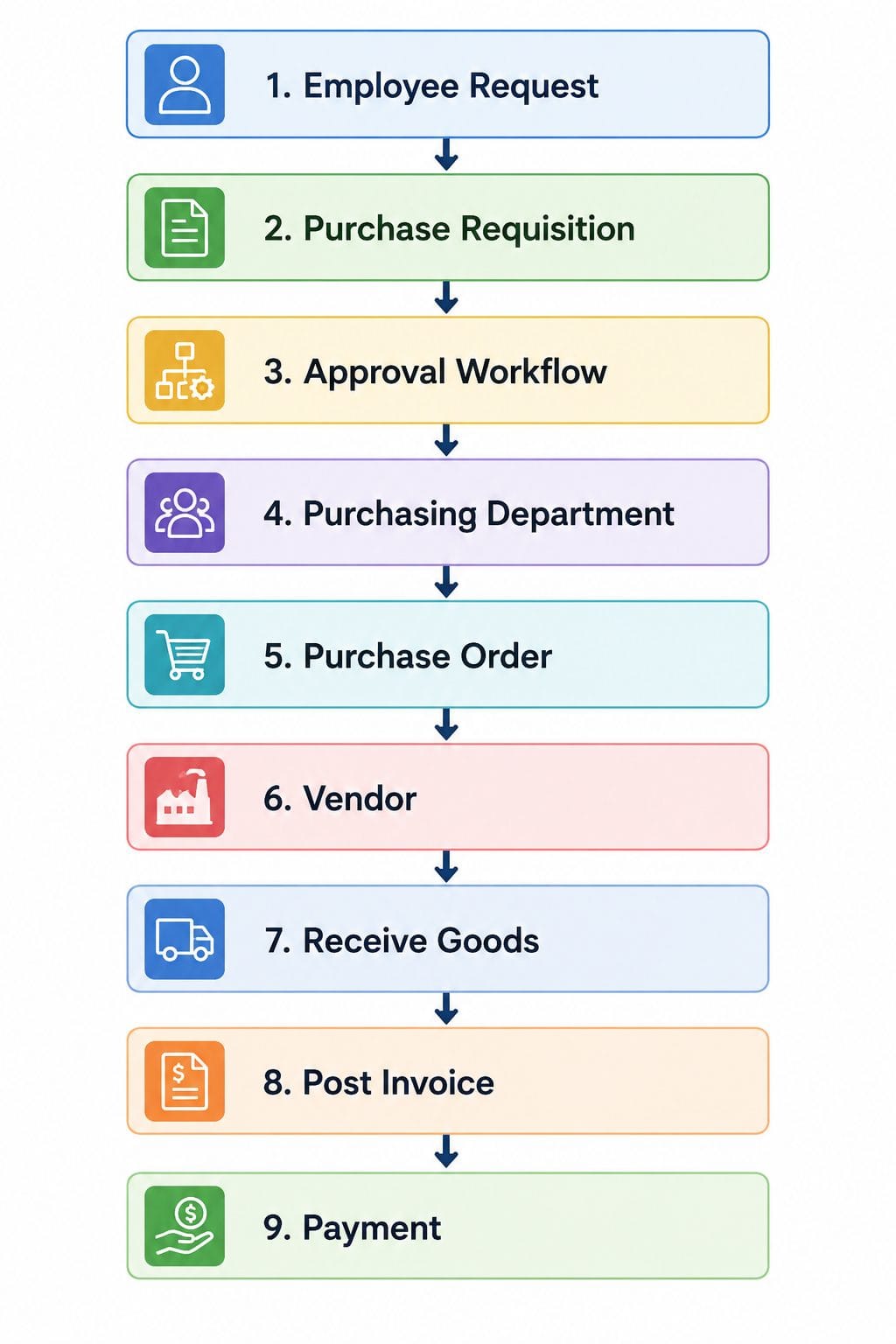 This process ensures purchasing decisions are reviewed before financial commitments are made. For organizations handling emergency purchase requisition scenarios, approval rules can be configured to fast-track urgent requests while maintaining audit trails.
Native Workarounds in Business Central
Although Business Central lacks dedicated requisitions, businesses can build approval processes using native capabilities.
Purchase Approval Workflows
The Business Central native purchase approval workflow enables organizations to approve purchase documents before they are processed.
Approvals can be based on:
- Purchase amount
- User hierarchy
- Department
- Responsibility center
- Workflow conditions
This supports the broader Business Central procurement approval process and helps enforce purchasing controls.
Requisition Worksheets
Another commonly misunderstood feature is the Requisition Worksheet.
Business Central requisition worksheet vs purchase requisition is important.
The Requisition Worksheet is designed for inventory planning and replenishment. It recommends purchase orders based on demand, reorder points, and planning parameters.
It is not intended for employee purchasing requests or departmental approvals.
Limitations of Native Workarounds
While native workflows are useful, they have limitations:
- Employees cannot easily submit requisitions.
- No dedicated purchase requisition form.
- Limited requester tracking.
- No requisition-to-PO conversion process.
- Minimal procurement reporting.
- Not ideal for decentralized purchasing.
These limitations often lead companies to adopt specialized solutions.
Purchase Requisition Add-ons for Business Central
Several vendors offer purchase requisition app solutions through Microsoft AppSource.
A typical Business Central purchase requisition add-on includes:
- Employee self-service requisitions
- Configurable approval workflows
- Multi-level approvals
- Budget validation
- Department-based routing
- Mobile approvals
- Automatic purchase order creation
- Complete audit history
When selecting an add-on, consider:
- Ease of implementation
- Business Central compatibility
- Workflow flexibility
- Licensing costs
- Integration with existing purchasing processes
- Vendor support
Many organizations begin with standard approval workflows and later implement an AppSource extension as procurement complexity increases.
Step-by-Step: Setting Up a Purchase Requisition Workflow in Business Central
If you are wondering how to set up purchase requisition in Business Central, the implementation process typically involves defining procurement rules, selecting the right solution, configuring approvals, creating request forms, testing workflows, and training users. A well-designed workflow ensures purchase requests move smoothly from submission to approval and eventually to purchase order creation.
Step 1: Define Your Procurement Policy
The first step is to establish a clear purchase requisition policy that defines how purchasing requests should be managed across the organization. This includes setting approval thresholds, assigning department responsibilities, establishing spending limits, and defining procedures for emergency purchasing situations. A clearly documented policy helps employees understand purchasing requirements and reduces approval delays by ensuring every request follows a consistent process.
Step 2: Choose Your Requisition Solution
After defining your procurement requirements, the next step is selecting the right approach for managing purchase requisitions in Business Central. Organizations can use native Business Central approval workflows, implement a dedicated purchase requisition application from Microsoft AppSource, or develop a custom extension based on their specific needs. The right solution depends on factors such as business size, procurement complexity, approval requirements, and the level of automation required.
Step 3: Configure Approval Workflows
Once the solution is selected, approval workflows need to be configured according to the organization’s purchasing rules. Businesses can create approval conditions based on purchase amount, department, project, vendor, or request type. A properly configured purchase requisition approval workflow ensures requests are automatically routed to the correct managers or stakeholders, reducing manual follow-ups and improving approval efficiency.
Step 4: Create Standard Purchase Requisition Forms
Creating a standardized purchase requisition form ensures that employees provide all necessary information before submitting a request. The form should capture important details such as item or service requirements, business justification, required delivery date, budget information, and supporting documents. A well-structured form helps approvers make faster decisions and reduces errors caused by missing or incomplete information. Understanding how to write a purchase requisition properly also improves communication between requesters, procurement teams, and managers.
Step 5: Test the Workflow
Before launching the purchase requisition process across the organization, it is important to test the workflow thoroughly. This involves submitting sample requests, verifying approval routing, testing different approval scenarios, confirming notifications, and ensuring approved requests can be converted into purchase orders correctly. Proper testing helps identify configuration issues early and ensures the workflow operates smoothly before users begin relying on it.
Step 6: Train Employees
The final step is training employees on how to use the purchase requisition system effectively. Users should understand how to create requisitions, attach supporting documents, track approval progress, and monitor request status. Proper training encourages adoption, reduces user errors, and ensures employees follow the correct purchase requisition process. Regular guidance also helps organizations maximize the value of their Business Central procurement workflow.
Benefits of Purchase Requisition Integration with Business Central
Implementing a purchase requisition workflow in Microsoft Dynamics 365 Business Central helps organizations establish better control over procurement while improving efficiency and transparency. Whether you’re using native approval workflows or a dedicated purchase requisition add-on, the following benefits can significantly enhance your purchasing operations.
Better Spending Control
A purchase requisition ensures that every purchasing request is reviewed and approved before a purchase order is created. This prevents unauthorized purchases, reduces unnecessary spending, and helps organizations stay within approved budgets. It also gives finance teams greater oversight of procurement decisions before financial commitments are made.
Improved Compliance
A structured purchase requisition approval workflow helps organizations enforce internal procurement policies consistently across all departments. Approval rules, spending limits, and authorization levels are applied automatically, reducing the risk of policy violations. This creates a standardized procurement process that supports both internal governance and external compliance requirements.
Faster Procurement
Manual approval processes often involve lengthy email chains and paper-based forms that delay purchasing. By automating the purchase requisition process within Business Central, requests are routed instantly to the appropriate approvers. This shortens approval cycles, reduces administrative work, and enables procurement teams to respond more quickly to business needs.
Complete Audit Trail
Every stage of the purchase requisition lifecycle from submission and approval to purchase order creation is recorded within the system. This provides a clear audit trail that helps organizations track who requested, approved, or modified each transaction. Such visibility is especially valuable during financial audits and compliance reviews.
Increased Visibility
A centralized purchase requisition system gives procurement managers real-time visibility into all pending, approved, and rejected requests. Decision-makers can monitor purchasing trends, identify approval bottlenecks, and analyze departmental spending more effectively. This improved transparency supports better planning and operational decision-making.
Stronger Budget Management
Purchase requisitions allow organizations to review spending requests before purchase orders are issued, helping departments stay within allocated budgets. Managers can identify potential overspending early and prioritize purchases based on business needs. This proactive approach improves financial planning and reduces unexpected procurement costs.
Better Collaboration
An integrated purchase requisition workflow connects employees, department managers, procurement teams, and finance staff through a single approval process. Everyone involved has visibility into the request status, reducing communication gaps and duplicate work. The result is a more collaborative, transparent, and efficient procurement operation.
Scalable for Small Businesses
A purchase requisition system for small business enables growing organizations to implement professional procurement controls without investing in complex enterprise software. Automated approvals, standardized request forms, and clear workflows help small businesses improve purchasing accuracy, control costs, and scale their operations as they grow.
Conclusion
A purchase requisition is the foundation of a well-controlled procurement process. It helps organizations manage spending, improve transparency, and ensure purchases are properly approved before purchase orders are issued. Although Microsoft Dynamics 365 Business Central does not provide a native purchase requisition module, businesses can still achieve effective procurement management using built-in approval workflows or dedicated AppSource extensions. Choosing the right approach depends on your organization’s size, purchasing volume, and compliance requirements.
By implementing a structured purchase requisition workflow, organizations can streamline approvals, strengthen financial controls, and create a more efficient procurement process within Business Central.
Frequently Asked Questions