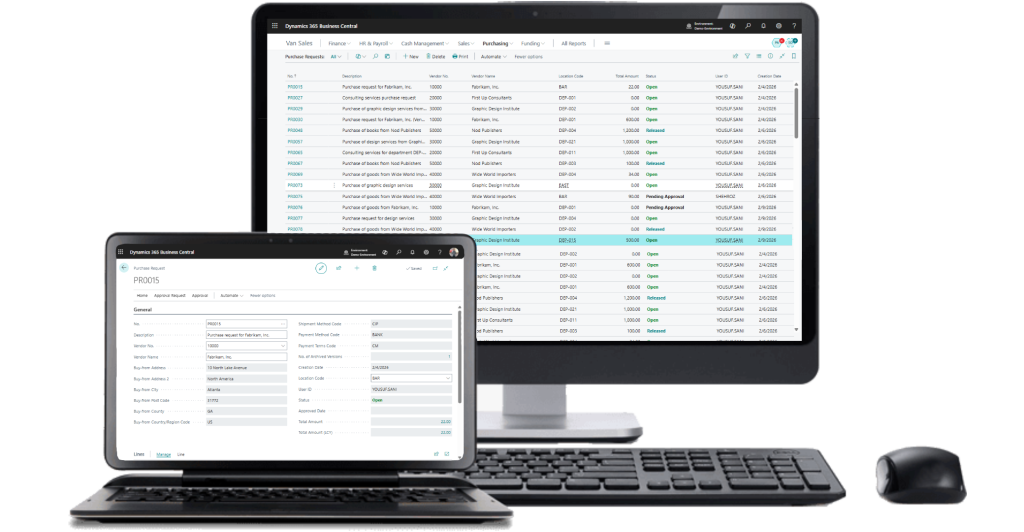
Purchase Requisition in Dynamics 365 Business Central

To get modern Purchase Requisition systems to facilitate smooth supply chain operations. With this system, you find better purchasing visibility and the ability to implement purchasing policies.

What is the Purchase Requisition Add-on for Dynamics 365 Business Central?

The purchase requisition add-on for Microsoft Dynamics 365 Business Central enables employees to raise a purchase requisition, a formal process before raising a purchase order. Moreover, it is an internal document that employees or departments must complete to raise a purchase order with suppliers. The meaning of a purchase requisition is related to authorization and control. Before the procurement team can raise the purchase order to the suppliers, the managers or supervisors must raise the purchase requisition.

Enhance Supply Chain Efficiency with Structured Purchase Requisition and Purchase Order

An organized purchase requisition system is the base of an efficient purchase process. With the advent of purchase requisition software, an employee can fill out the purchase requisition form online and attach the documents before submitting it for approval. After approval, the manager can submit it, and the purchasing department will convert it into a purchase order. Most organizations have been using a document, such as a sample purchase requisition form or a purchase requisition template. These documents can be helpful for understanding the purchase requisition form, but they are limited in scope and not efficient enough to perform the task effectively. By adopting purchase requisition automation technology, the purchase requisition company can offer an efficient system.
Key Features of Microsoft Dynamics 365 Business Central Purchase Requisition

A dedicated purchase requisition solution can enhance the product's functionality. Organizations can automate procurement processes.
Request Process Integration with Project Module
The purchase requisition system integrates with the project module. Organizations can link the request to the project. This ensures the project is budgeted correctly.
The system supports attaching documents such as specifications, quotes, or contracts to the purchase requisition. The notes provide an opportunity for the requester of the purchase order to add more information.
Dimensions assist in classifying the transaction by department, cost center, or project.
Automatic email notifications are sent to approvers for submitted or pending requisitions. Therefore, it will help expedite the approval of requisitions and minimize delays in the procurement process.
Requisitions have built-in reporting features that provide valuable information on requisition status and purchase trends. This helps analyze purchase behavior and optimize spend.
Role-based access ensures that only authorized users can create, approve, and modify requisitions. This ensures higher levels of compliance and security for procurement data.
Purchase requisition leads to a purchase quotation for vendor comparison or directly to a purchase order for quick procurement, ensuring efficiency and cost control.
Archive purchase requisitions to maintain version history, ensure audit compliance, track changes, and support accurate record-keeping for future reference and analysis.

Keep Your Business Drive Forward with Post - Implementation Support

The implementation of a structured solution for purchase requisition provides several benefits.

  • Flexibility to scale up or down as business needs change 

  • No resource planning worries or conflicts

  • No usage level commitmentsrequired

  • Pay only for what you use

  • Advisory services toassistin every phase of the Dynamics lifecycle 

Benefits of Using Purchase Requisition in Microsoft Dynamics 365 Business Central

The implementation of a structured solution for purchase requisition provides several benefits.

Improved Governance over Procurement

Organizations can have better governance of their procurement activities.

Faster Approval Process

The automated notifications enable a faster approval process for procurement activities.

Fewer Manual
Errors

The automated process avoids data duplication and manual calculations. ​

Better Project and Cost Management

The integration of a financial module and a project module can help in proper budgeting.

Improved Reporting and Traceability

Organizations can keep a record of every step in the process of generating a purchase order.

Transform Your Supply Chain with Purchase Requisition Solution Implementation

The implementation of a purchase requisition solution in Microsoft Dynamics 365 Business Central enables an organization to go digital with procurement activities and gain full visibility into all procurement activities.

Purchase Requisition Setup

The system is set up in accordance with company policies and procedures, approval limits, and all other purchasing rules.

Role Center for Monitoring Requests

The system provides a role center for managing all purchase requisition requests.

Purchase Requisition Window

The system provides a window for creating and managing all purchase requisition requests in an intuitive manner.

Create Purchase Request

Employees can submit a purchase request directly in the system.

Automated Purchase Requisition Process Right From Where It Starts

The automated purchase requisition system delivers full process automation by creating a purchase requisition, obtaining final approval, and issuing purchase orders. The organization should implement an electronic purchase requisition system because it provides better automation for the purchase requisition process than the current purchase requisition authorization form. Companies use automated purchase requisitions to achieve compliance with their internal purchasing procedures while gaining instant access to their procurement processes.

Key Components of a Complete Purchase Requisition Form

A complete purchase requisition form includes all the necessary information for approval and purchase

Requestor User ID

This field helps to identify the employee or department requesting the purchase.

Date of Creation

This field helps to track the purchase requisition.

Description of Goods or Services

This field includes the complete information about the purchase.

Quantity & UOM (Unit of Measure)

This field includes the number of items to be purchased and the unit of measurement.

Unit Cost & Total Cost

This field displays the cost of the items to be purchased.

Vendor Information

This field includes the information of the preferred vendor.

Attachments & Notes

This field allows the requester to attach additional documents.

Status

This field displays the status of the purchase requisition.

Approval

This field includes the approval status of the requester's purchase.

Reporting

This field helps to analyze the purchase requisition for reporting purposes.

Purchase Requisition Process Flow in Microsoft Dynamics 365 Business Central

The automated workflow for purchase requisitions in Business Central is a simplified, controlled process.

Go to “My Purchase Requisitions” – Open the purchase requisition module in Business Central.

User creates a Purchase Requisition (Header & Lines) – Enter the details regarding the purchase requisition.

Select Items or Services – Enter the selected items from the procurement catalog or enter custom details.

Submit for Approval – The purchase requisition is forwarded to the responsible persons according to the workflow.

Approval workflow is triggered based on company rules and authorization level.

Track Status – The status of the purchase requisition is tracked from the draft to the approval status.

Convert to Purchase Order – Once approved, the purchase order is automatically created in Business Central and sent to the supplier.

Requisition status is updated according to the setup (Approved, Closed, or Archived).

Why Choose Evincible Solutions?

Evincible Solutions, a Microsoft Certified Partner, has successfully implemented purchase requisition modules for Microsoft Dynamics 365 Business Central across its extensive operations. Our experts can assist clients throughout their purchase requisition process, including Microsoft Dynamics 365 Business Central customization, training, implementation, and extension development in accordance with Microsoft Dynamics standards. Your business can benefit greatly by engaging Evincible Solutions and adopting a flexible purchase requisition solution that adapts to its needs as it expands.

Blogs

Get In Touch