Streamlining Asset Performance Through The Microsoft Dynamics 365 Asset Management System

Microsoft Dynamics 365 Finance and Operations provides businesses with an effective Asset Management software solution that enables them to monitor and manage their assets throughout all stages of the asset lifecycle. Contact us to learn more about our services.

What is Asset Management in Microsoft Dynamics 365 Finance and Operations?

Microsoft Dynamics 365 Finance and Operations provides an asset management module that enables your business to manage its physical assets throughout their lifecycle. Your business needs to handle all physical assets, which include machines and vehicles, production equipment, buildings, and the infrastructure that supports its operations.

Hence, businesses should maintain complete asset details, which include the asset's location, status, usage history, and required maintenance activities. The asset management software will improve organizational asset management by providing tools to help organizations determine their asset distribution needs. The organization will use this information to make decisions about its upcoming capital expenditures. The Microsoft asset management platform can carry out preventive maintenance programs.
Asset Management in Microsoft Dynamics 365

Asset Management in Dynamics 365 Finance and Operations is a comprehensive solution that integrates with all system components, including financial management and stock management. The system establishes an integrated environment that synchronizes operational information with financial records.

Key Features of Asset Management

Microsoft Dynamics 365 Asset Management offers a wide range of features to help businesses manage assets effectively and maintain operational efficiency.
Asset Lifecycle Management
The system enables businesses to manage assets from the moment they are acquired until the end of their lifespan. This means a company can track when an asset was purchased, where it is located, how it is used, and when it is due for maintenance or replacement.
Access and update asset data in real time, ensuring accurate visibility of asset status, location, and usage across all departments.
Easily synchronize asset data manually when needed, allowing flexibility in environments with limited or no continuous connectivity.
Seamlessly connect RFID devices via LAN or Bluetooth to automatically capture and update asset information, reducing manual effort and errors
Efficiently manage asset counting and transfers between warehouses with accurate tracking and streamlined inventory operations.
Track and verify asset locations by visiting specific sites, enabling precise location-based asset validation and management.
Assign tags to assets individually or in bulk, simplifying identification, tracking, and inventory management processes.
Single sign-on integration with Microsoft Azure Active Directory. Users authenticate with their corporate credentials for seamless access.

Asset Management in Microsoft Dynamics 365 Finance & Operations | Evincible Solutions

Improve asset lifecycle management, automate maintenance, and enhance visibility with our Dynamics 365 Finance & Operations solution. Maximize ROI and operational efficiency with Evincible Solutions.

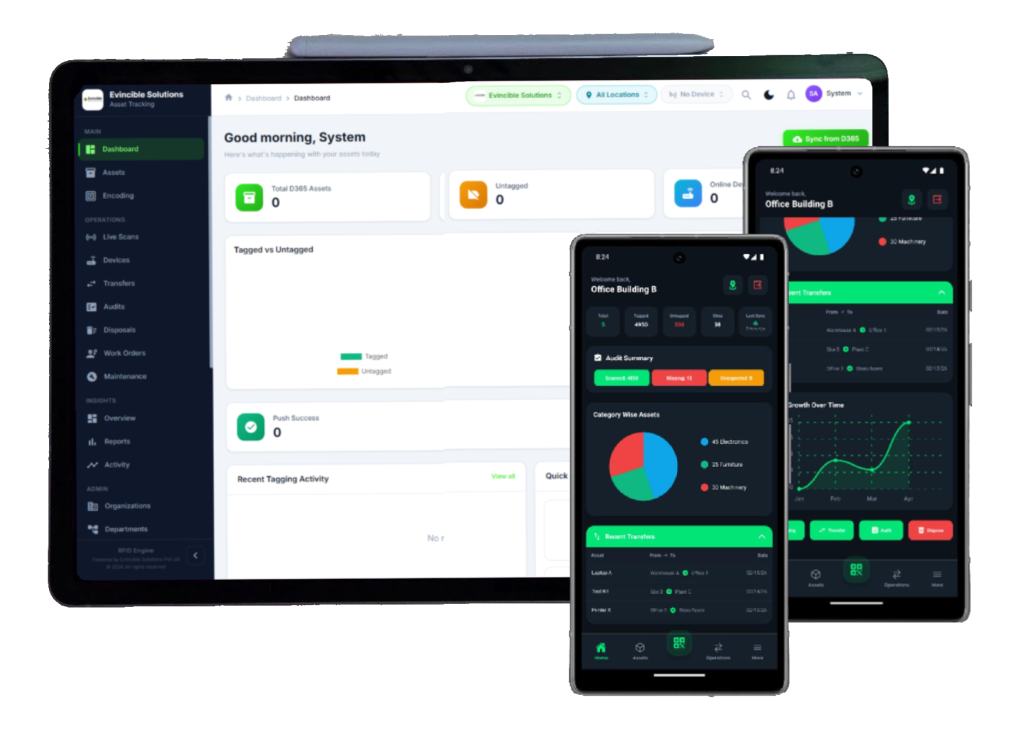
Everything You Need for Asset Management

A comprehensive suite of tools designed for enterprise-grade asset tracking and control.

Asset Management

Track, categorize, search, and export your entire asset inventory. Advanced filtering, bulk operations, and detailed asset profiles with complete history.

RFID Tagging

Encode, associate, and manage RFID tags with intuitive scanning workflows. Support for bulk tagging sessions with real-time progress tracking.

Disposal Management

End-of-life asset tracking with approval workflows. Maintain compliance records and automatically update D365 when assets are retired.

Transfer Management

Location-to-location asset transfers with configurable acknowledgment workflows. Full audit trail from request through to completion.

Audit & Compliance

Schedule and execute physical audits using RFID scanning. Automated variance detection compares expected vs. found assets in real time.

D365 Integration

Bidirectional synchronization with Microsoft Dynamics 365. Pull assets, push RFID data, sync locations, and maintain field mappings.

Reports & Analytics

Inventory reports, utilization analytics, scan session summaries, and exportable data. Drill down from high-level metrics to individual assets.

Real-time Dashboard

Live KPI widgets, charts, and activity feeds. Monitor asset counts, scan sessions, transfer status, and system health at a glance.

Adaptive Interface

Full dark and light theme support with responsive design that works across desktops, tablets, and mobile devices.

Industries Using Asset Management

Many industries rely on physical assets to provide products and services. Asset Management in Dynamics 365 is widely used across these industries.

Manufacturing

Manufacturing companies rely on physical assets to maintain continuous operations. Asset management in Dynamics 365 can be very helpful in these types of companies.

Construction

Construction companies have fleets of heavy equipment, including cranes, excavators, and trucks. Asset management software can be very helpful in these types of companies.

Energy and Utilities

Energy companies have complex assets, including power plants, pipelines, and distribution networks. Asset management in Dynamics 365 can be very helpful in these types of companies.

Logistics

Companies that operate in the transportation industry can use asset management in Dynamics 365 to track fleets and manage logistics operations.

Facility Management

Companies responsible for managing facilities can use Dynamics 365 asset management to manage facility assets.

Food and Beverages

Companies responsible for managing facilities can use Dynamics 365 asset management to manage facility assets.

Healthcare

Companies responsible for managing facilities can use Dynamics 365 asset management to manage facility assets.

Warehouse Management

Companies responsible for managing facilities can use Dynamics 365 asset management to manage facility assets.

Ready to Transform Your Business?

Empower innovation and drive efficiency with tailored solutions from Evincible Solutions, built on Microsoft Dynamics 365.

Benefits of Using Asset Management in Dynamics 365

Implementing Asset Management in Dynamics 365 provides benefits to businesses across industries.

Improved Equipment Reliability

Implementing Asset Management in Microsoft Dynamics 365 ensures that equipment is always in good working condition. This way, the business will be able to avoid any unexpected equipment failures.

Lesser Maintenance Costs

The asset management software will also allow the company to avoid maintenance costs. Additionally, it will increase the equipment's lifespan. This way, the company will be able to avoid replacing the equipment frequently.

Increased Operational Efficiency

The software solution will also allow the company to increase its efficiency. This is because the maintenance team will have access to the asset information. This way, the maintenance team will be able to perform their task more effectively.

Improved Decision-Making

Asset management software will also allow the company to make better decisions. This is because it can access the reporting tools.

Enhanced Compliance and Safety

Some industries require organizations to maintain detailed records of inspection and maintenance activities. Asset management software can help companies track these records, thereby ensuring regulatory compliance.

Improved Resource Management

Asset management software can help businesses manage resources effectively. It can be a great blessing to run your business operations smoothly.

Key Components of a Complete Purchase Requisition Form

A complete purchase requisition form includes all the necessary information for approval and purchase

Requestor User ID

This field helps to identify the employee or department requesting the purchase.

Date of Creation

This field helps to track the purchase requisition.

Description of Goods or Services

This field includes the complete information about the purchase.

Quantity & UOM (Unit of Measure)

This field includes the number of items to be purchased and the unit of measurement.

Unit Cost & Total Cost

This field displays the cost of the items to be purchased.

Vendor Information

This field includes the information of the preferred vendor.

Attachments & Notes

This field allows the requester to attach additional documents.

Status

This field displays the status of the purchase requisition.

Approval

This field includes the approval status of the requester's purchase.

Reporting

This field helps to analyze the purchase requisition for reporting purposes.

Our Asset Management Implementation Services

Implementing an asset management software successfully requires proper planning, technical skills, and a thorough understanding of business processes. Our Asset Management Implementation Services are available to help organizations effectively implement Microsoft Dynamics 365.

Business Process Analysis

Our first step would be to analyze the organization’s asset management business processes and understand the associated problems.

System Configuration and Customization

Our professionals would configure the Microsoft Dynamics 365 asset management module according to the organization’s business needs. 

Data Migration and Integration 

Our experts would ensure smooth data migration from existing systems into the new system. Also, we would ensure that the Microsoft Asset Management D365 Finance and Operations system is integrated with other existing business applications.

User Training 

Our specialists can provide the necessary training to ensure users properly use the Microsoft Dynamics 365 Asset Management module.

Continuous Optimization 

Our professionals would work with the organization after implementing the solution to ensure that it is running optimally. The organization can use Asset Management in Dynamics 365 module appropriately with the help of our professionals. 

Built for Scale and Performance

Enterprise-grade technology choices that ensure reliability, speed, and maintainability.

Microservices Architecture

Each service scales independently. Deploy updates to one component without affecting others.

Real-time Updates

SignalR WebSocket connections deliver instant notifications, live scan feeds, and dashboard updates.

Multi-Database Design

Separated databases for business data, identity, and logs ensure security isolation and query performance.

API First Approach

RESTful APIs with comprehensive documentation enable third-party integrations and custom client development.

Adaptive Interface

Full dark and light theme support with responsive design that works across desktops, tablets, and mobile devices.

Comprehensive Logging

Every operation is logged with timestamps, user context, and affected entities for complete auditability.

Enterprise-Grade Security

Multiple layers of security ensure your asset data is protected at every level.

JWT Authentication

Industry-standard JSON Web Token authentication with configurable token expiry, refresh tokens, and secure cookie handling.

Role-Based Access Control

Granular permission system with predefined roles. Every API endpoint and UI element is protected by role-based authorization.

Tenant Data Isolation

Complete data separation between tenants. Each organization's data is logically isolated with no cross-tenant access possible.

Azure AD SSO

Single sign-on integration with Azure Active Directory. Users authenticate with their corporate credentials for seamless access.

Audit Trail Logging

Complete audit trail for all operations. Who did what, when, and to which assets. Immutable log storage in a dedicated database.

API Key Management

Secure API key authentication for service-to-service communication and third-party integrations with configurable permissions.

Deployment Options

Deploy Your Way

Flexible deployment options to match your infrastructure requirements and compliance needs.

On-Premises

Full control over your data and infrastructure. Deploy within your data center with your existing security policies and network configuration.

Cloud (Azure)

Fully managed cloud deployment on Microsoft Azure. Auto-scaling, managed backups, and global availability with minimal operational overhead.

Hybrid

Combine on-premises and cloud components. Keep sensitive data on-premises while leveraging cloud for analytics, sync, and mobile access.

Containerized deployment using Docker ensures consistent behavior across all environments. The microservices architecture makes it straightforward to distribute services across on-premises and cloud infrastructure as needed.

Why Choose Evincible Solutions?

Evincible Solutions, a Microsoft Certified Partner, delivers practical Asset Management solutions using Dynamics 365 Finance and Operations to help businesses gain full control over their assets. We focus on simplifying asset tracking, improving maintenance planning, and reducing downtime across industries like manufacturing, construction, and logistics. Our team aligns the solution with your business processes through expert configuration, customization, and seamless integration. From implementation to user training and ongoing support, we ensure everything runs efficiently. Partnering with us means a scalable solution that improves performance, lowers costs, and enables better decision-making.

Blogs

Get In Touch