Managing customers becomes more complicated when one business operates through multiple branches, subsidiaries, stores, franchises, or regional entities. A parent organization may receive and make payments on behalf of several related customer accounts, while each location still needs its own invoices, transactions, and balances. This is where National Accounts in Dynamics 365 Business Central and Parent-Child Account Management in Business Central become important. A structured parent-child model can give finance teams a clearer view of related customer accounts while supporting more efficient payment allocation, reconciliation, and accounts receivable management. It is important to distinguish between standard Business Central customer functionality and dedicated National Account or PCAM functionality. Business Central provides customer ledger entries, payment application, credit memo application, posting groups, and reporting capabilities, but more complex cross-customer parent-child processes may require configuration, customization, or an extension.
What Are National Accounts in Dynamics 365 Business Central?
In simple terms, a National Account is a way of managing several related customer accounts as part of one broader business relationship. For example, imagine a retail group with a headquarters and 20 stores. Each store may need its own customer record because invoices and transactions relate to individual locations. However, the headquarters may make payments covering invoices from several stores.
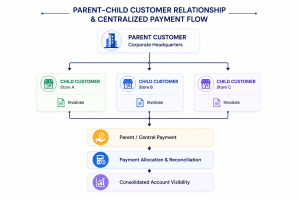
The parent customers represent the larger organization, while child customers represent subsidiaries, branches, stores, or other related entities. Individual invoicing can remain at the child-account level while payment and financial oversight can be managed through a broader relationship. Business Central’s customer ledger records transactions such as invoices, payments, remaining amounts, due dates, and open or closed status.
What Is Parent-Child Account Management (PCAM)?
Parent-Child Account Management (PCAM) is the structured process of connecting related customer accounts so finance teams can manage them as a business relationship rather than treating every account as completely independent.
Parent Accounts
The parent account represents the main organization or corporate entity. It may handle centralized payments, credit oversight, or financial coordination across multiple related customers.
Child Accounts
Child accounts can represent subsidiaries, branches, stores, franchises, regional entities, or other locations that conduct business under the wider organization. Each child can retain its own transactions and customer history while remaining connected to the parent relationship.
Parent-Child Customer Relationships
The relationship creates a logical hierarchy between the parent and its related customers. This helps finance teams answer questions such as: Which invoices belong to this corporate group? Which locations have outstanding balances? Has the parent made a payment covering several accounts?
Centralized Financial Management
PCAM can make centralized financial management more practical by connecting customer information, payment activity, balances, and transaction history. The exact functionality depends on how the solution is implemented in Business Central.
Why Do Businesses Need National Account Management?
Without a structured approach, finance teams may need to work across multiple customer cards, spreadsheets, emails, and manual reconciliation processes.
Payments Received From the Parent Company
A parent organization may send one payment covering invoices issued to several child customers. Standard Business Central supports applying payments to one or multiple customer ledger entries, but cross-account parent-child processes can require additional configuration or functionality.
Multiple Customer Balances
Finance teams need to understand both individual child-account balances and the broader exposure of the related organization.
Manual Payment Allocation
When payment references do not clearly identify every invoice, allocating funds can take considerable time. Business Central supports applying payments to multiple customer ledger entries, but organizations with complex account hierarchies may benefit from a more structured process.
Lack of Consolidated Customer Visibility
Reviewing every account separately can make it difficult to understand the total outstanding position of a corporate group.
Complex Customer Structures
National Account Management is particularly relevant when organizations have:
- Multiple branches
- Subsidiaries
- Franchises
- Retail locations
- Regional entities
- Centralized finance departments
How National Accounts Work in Dynamics 365 Business Central
A typical National Account workflow can be represented as follows:
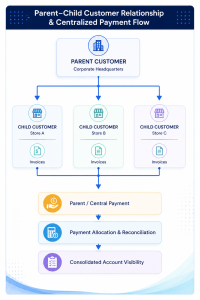
Business Central supports applying payments to multiple customer ledger entries and applying credit memos to multiple entries. This provides the underlying receivables functionality that a more advanced National Account process can build upon.
Key Benefits of Parent-Child Account Management
Centralized Payment Management
PCAM helps finance teams manage payments received from a parent organization and apply them to invoices belonging to related child accounts. This creates a more organized payment process while maintaining visibility into individual customer transactions.
Better Accounts Receivable Visibility
Finance teams can view the financial position of the overall parent organization while still tracking each child account separately. This makes it easier to identify outstanding balances, overdue invoices, and the source of customer exposure.
Faster Payment Reconciliation
A structured parent-child relationship makes it easier to identify which child invoices should be covered by a parent payment. This can reduce manual searching and make the reconciliation process faster and more accurate.
Improved Customer Account Management
PCAM provides a consistent way to organize branches, subsidiaries, stores, or other customers that belong to the same corporate group. Teams can maintain individual customer records while also understanding how those accounts are connected.
Better Financial Reporting
Customer ledger information can provide details such as invoices, payments, remaining amounts, due dates, and transaction status. A National Account structure can bring related account information together, giving finance teams a broader view of the customer’s financial position.
Reduced Manual Work
Clearly defined parent-child relationships can reduce dependence on spreadsheets and manual tracking methods. Finance teams can spend less time gathering information across separate accounts and more time managing collections, payments, and customer relationships.
National Accounts vs. Standard Customer Management in Business Central
Business Central has strong standard customer and receivables functionality. However, do not assume every National Account or PCAM capability is native. Complex parent-child structures and cross-customer processes may require configuration, customization, or a dedicated extension.
| Capability | Standard Customer Management | National Account / PCAM Approach |
| Parent-child relationships | Limited / may need configuration | Structured relationship |
| Multiple related customers | Separate records | Linked accounts |
| Centralized payments | May require workarounds | Designed around related accounts |
| Payment allocation | Standard application features available | More streamlined for related accounts |
| Parent-level visibility | Limited | Improved |
| Child-level visibility | Available per account | Available within account hierarchy |
| Reconciliation | Can require more manual effort | More structured |
| Multi-customer account management | More complex | More centralized |
Microsoft documentation confirms that Business Central supports payment application against one or multiple customer ledger entries, while customer ledger entries remain associated with specific customer accounts.
How PCAM Can Improve Accounts Receivable Operations
For finance teams, the value of Parent Child Account Management goes beyond simply creating a hierarchy.
Payment allocation becomes easier to control when teams can identify which child invoices a parent payment covers.
Credit memo management can also be structured around the appropriate customer transactions. Business Central supports applying credit memos to one or multiple customer ledger entries.
Customer ledger visibility gives finance users access to transaction-level information, including remaining amounts and open status. This supports more accurate balance tracking and collection activities.
Most importantly, PCAM can provide parent-level oversight without losing child-level transaction visibility. This helps AR teams monitor the overall relationship while still investigating individual invoices, payments, credits, and balances.
Who Can Benefit From National Account Management?
National Account Management can be useful for:
- Retail chains
- Franchise groups
- Distribution companies
- Buying groups
- Corporate groups
- Multi-branch organizations
- Organizations with centralized payment departments
- Companies managing multiple related customer accounts
These organizations often need to balance two requirements: maintaining separate customer records for operational accuracy while managing financial relationships at a higher organizational level.
How to Implement National Account Management in Dynamics 365 Business Central
Step 1: Identify Parent and Child Accounts
Start by mapping the customer structure. Determine which organization should be treated as the parent and which branches, subsidiaries, stores, or entities should be treated as children.
Step 2 : Define Customer Relationships
Establish clear rules for how parent and child accounts are connected. Define who is responsible for payment, credit, collections, and account ownership.
Step 3 : Configure Payment Processes
Document how centralized payments will be received and allocated. Business Central provides cash receipt journals and customer entry application features that can support these processes.
Step 4 :Define Reporting Requirements
Decide what finance teams need to see at the parent and child levels. Consider outstanding balances, aging, payment history, credit exposure, invoices, and credit memos.
Step 5: Configure the PCAM Solution
If the required parent-child functionality goes beyond standard Business Central capabilities, configure an appropriate PCAM or National Account extension or custom solution. The goal should be to extend existing Business Central processes rather than create disconnected workflows.
Step 6: Test Payment and Reconciliation Workflows
Test real-world scenarios, including partial payments, one payment covering multiple invoices, credit memos, unapplied payments, and corrections.
Step 7: Train Finance Teams
Finally, train AR and finance users on how to create relationships, allocate payments, review balances, investigate transactions, and reconcile accounts.
Conclusion
National Accounts in Dynamics 365 Business Central provide a practical framework for organizations that need to manage multiple related customer accounts while maintaining clear financial visibility. Business Central already provides important building blocks for receivables management, including customer ledger entries, cash receipt journals, payment application, credit memo application, and posting groups. However, businesses with complex parent-child customer structures may need additional configuration, customization, or a dedicated PCAM solution to achieve centralized account management. For finance teams, the objective is straightforward: keep individual customer transactions accurate while making the wider customer relationship easier to manage, monitor, and reconcile.